

Installation
Install WC AttribPress 4.0 on your WordPress site in a few minutes.
Requirements
- PHP 8.2+
- WordPress 6.8+
- WooCommerce® 10+, active on the site (HPOS compatible)
- An administrator account on the site
Warning: WC AttribPress changes product attributes and terms in bulk. Make a full backup of your database before your first large operation.
1. Download the plugin
After your purchase of WC AttribPress Pro, Freemius sends you an e-mail with your license key and a link to download the plugin as a zip file. Keep this e-mail: you need the license key in step 3. You can also download the latest version from your Freemius customer account.
2. Upload it to WordPress
- In your WordPress admin, go to Plugins › Add New Plugin.
- Click Upload Plugin, choose the zip file, then click Install Now.
- Click Activate Plugin.
A new AttribPress menu appears in your admin, below WooCommerce and Products. If WooCommerce is not active, a notice says that WC AttribPress requires it.
3. Activate your license
Open AttribPress and click Activate your license. Until your license is active, the screen shows only this button and no tools. Follow License activation.
4. Start working
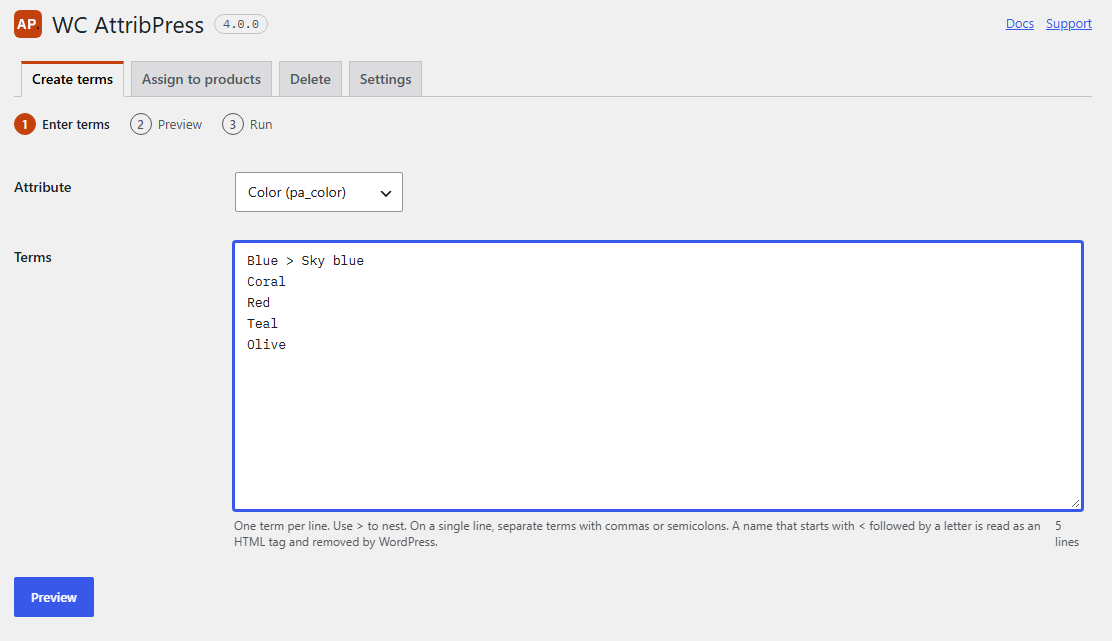
Once your license is active, the AttribPress screen shows four tabs: Create terms, Assign to products, Delete and Settings. Administrators also see a License tab. If you want to nest terms, turn on the Hierarchy first: see Hierarchy.
Who can use the tools
Any user who can manage WooCommerce: administrators and shop managers. The License tab is shown only to administrators.
Multisite
On a multisite network, activate WC AttribPress on each site where you need it, from that site’s Plugins screen. Network activation is not supported in 4.0: if you try it, a notice asks you to activate the plugin on each site instead.
- Each site uses one activation of your license (1, 5 or unlimited, depending on your license).
- Upgrading from 3.x on a network? See Upgrade from 3.x › Multisite.
Languages
The WC AttribPress screens are available in English and French. They follow the language WordPress uses for your admin: the language of your user profile (Users › Profile › Language), or else the site language (Settings › General › Site Language). There is nothing to install: the French translation ships with the plugin.
Your terms are never translated: they are created exactly as you type them.
Updates
While your license is active, new versions appear in Dashboard › Updates like any other plugin. If your license expires, the plugin keeps working; renew to receive updates and support again.
Upgrading from version 3.x?
WC AttribPress 4.0 installs next to Bulk Attributes for WooCommerce® 3.x and takes over from it. Read Upgrade from 3.x before you install.
Uninstall
Deactivate the plugin, then delete it from the Plugins screen. Only its own settings and tasks are removed: your attributes, terms, hierarchies and product assignments stay in place. If you remove the plugin another way (for example with WP-CLI), its settings may stay in the database.