

Tasks and batches
Every operation runs as a task, in small batches. You can pause it, resume it, or close the tab and come back later.
How a task runs
- When you confirm a preview, WC AttribPress starts a task and processes it in batches of 25 items (terms or products).
- Each batch is also limited in time, so it stays well under your server’s time limit, even on a slow host.
- A progress bar shows the current batch, the items done and an estimate of the time left.
On a test store with 5,000 terms and 2,000 products, every batch finished in under 5 seconds.
Pause, resume, cancel
- Pause stops at the end of the current batch. Click Resume to go on.
- Cancel remaining stops the task for good. What was already done stays done.
- If a batch fails (for example, the server took too long to respond), click Retry this batch. Items already processed are not processed twice.
Close the tab, come back later
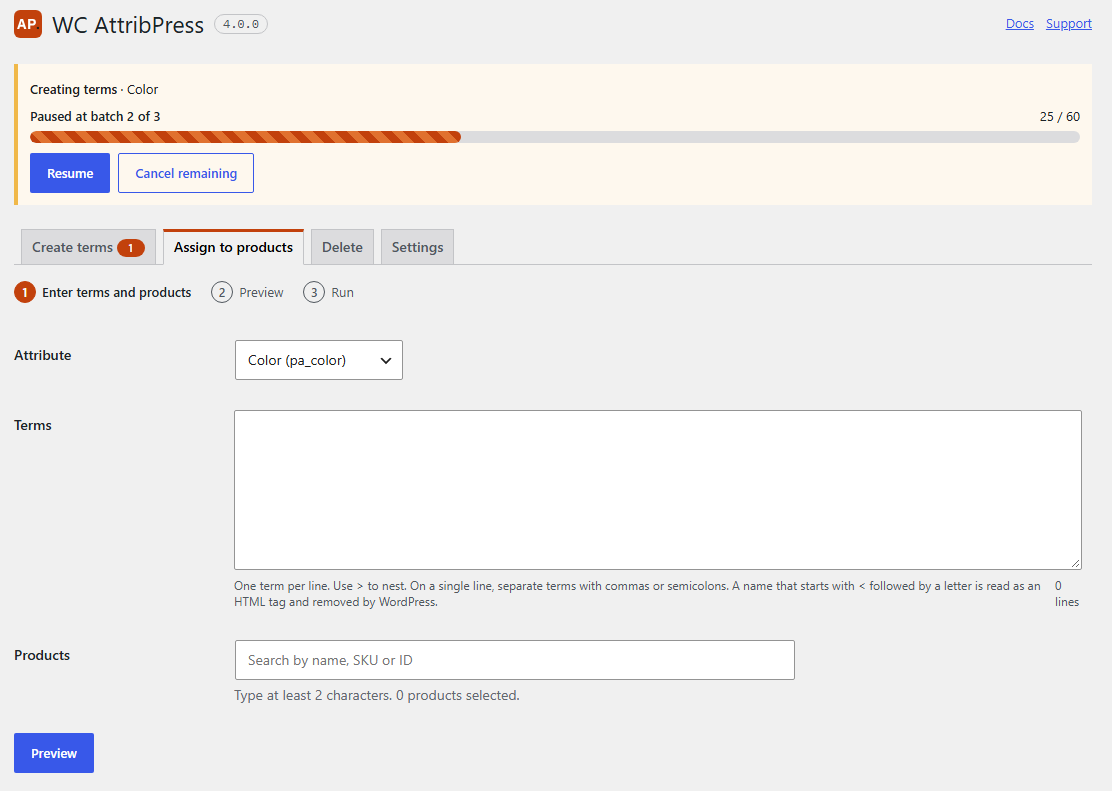
You can close the tab, or lose your connection, during a task. Nothing is lost: the task waits where it stopped. Next time you open AttribPress, a banner at the top shows the task with its progress and a Resume button, and the tab of the tool shows a counter.
One task per attribute
Each attribute can have one running or paused task at a time, so two operations never change the same terms together. If you start another one, a message tells you that the attribute already has a task: resume or cancel it first. Tasks on different attributes can run side by side.
Old tasks
A task left untouched for 7 days is cancelled. Finished tasks are cleaned up after 7 days. Your terms and products are never affected by this cleanup.
Several users
Tasks belong to the site, not to one user. Another administrator or shop manager can resume a task you started; products they are not allowed to edit are skipped.