

If you use Bulk Attributes for WooCommerce® 3.x, this guide is for you. Version 4.0 has a new name, WC AttribPress, and a new engine, and you choose when to switch.
Your catalog doesn’t move. WooCommerce stores your attributes, terms and product assignments, not the plugin, so there is nothing to export or import.
What stays the same
- Your attributes, terms, term hierarchies and the terms assigned to each product stay exactly where they are.
- Your Hierarchy setting carries over. When you activate 4.0, it reads the 3.x setting and uses the same value. 3.x had no other setting.
- 3.x keeps working until your 4.0 license is active. It gets security fixes until February 22, 2027, and your 3.x downloads stay in My account.
What changes
- 4.0 is a separate plugin in its own folder (
wc-attribpress), so it can run next to 3.x while you switch. - All the tools sit under one AttribPress menu, with tabs for Create terms, Assign to products, Delete and Settings. Administrators also see a License tab.
- Every change starts with a preview, line by line, and nothing is saved until you confirm. The work then runs in small batches that you can pause and resume.
- 4.0 needs a yearly WC AttribPress Pro license: $49 for 1 site, $99 for 5 sites or $199 for unlimited sites, with updates and support. If the license expires, the plugin keeps working; you just stop getting updates and support.
- It requires PHP 8.2+, WordPress 6.8+ and WooCommerce 10+, and supports HPOS.
The move, in five steps
- Back up your database, as before any plugin change.
- Get your license. As a 3.x customer, you get a special price on your first year. We’ve sent you an e-mail about it, so check your inbox before you go to Pricing.
- Install 4.0 next to 3.x: on the Plugins screen, choose Add New Plugin, then Upload Plugin, and activate WC AttribPress. Leave 3.x as it is. 4.0 copies your Hierarchy setting at this point (see the installation guide).
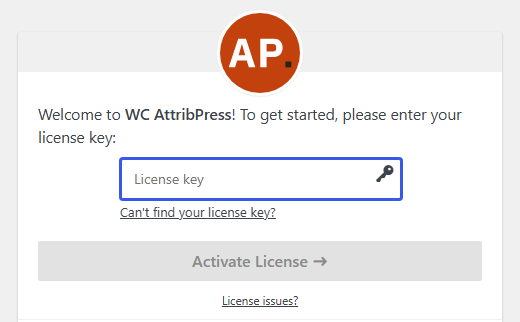
- Activate your license: paste your key in License key and click Activate License. 4.0 then deactivates 3.x and shows this notice: “Your settings from Bulk Attributes 3.x were imported. The 3.x plugin has been deactivated. You can delete it.” (see License activation).
- Open AttribPress › Settings and check the Hierarchy setting. 3.x is still installed, only deactivated; delete it from the Plugins screen once you’re comfortable with 4.0.
On multisite
4.0 is activated site by site. Repeat the steps on each site that used 3.x. Each site uses one activation of your license, so you’ll want the 5-site or unlimited license for several sites.
If 3.x was activated for the whole network, 4.0 won’t deactivate it from a single site. Once 4.0 and its license are active everywhere you need them, deactivate 3.x yourself in Network Admin › Plugins.
Questions we expect
Can 3.x and 4.0 run at the same time?
Yes, until you activate your 4.0 license. Until then 3.x works as before, and both versions see the same catalog because it lives in WooCommerce.
Can I go back to 3.x?
Yes. Deactivate WC AttribPress 4.0 first, then activate 3.x again from the Plugins screen. The order matters: while 4.0 is active with a license, it switches 3.x off again. Your catalog isn’t affected either way.
Will 4.0 change my 3.x setting?
No. 4.0 reads it once, the first time you activate 4.0, and never changes or deletes it. If you later change the Hierarchy setting in 4.0, 3.x keeps its own value.
I still run 3.0. Does this work for me?
Yes. 4.0 also recognizes the older 3.0 plugin and handles it the same way.
What if I uninstall 4.0 later?
Only the plugin’s own data is removed. Your attributes, terms, assignments and the 3.x setting stay.
And if I’m not ready to move?
Version 3.1.1 keeps working and gets security fixes until February 22, 2027, so you can move when it suits you.
Where to start
Check your inbox for your 3.x offer, then go to Pricing. Every purchase comes with a 14-day money-back guarantee. The upgrade guide in the docs has the same steps in short form, and if something goes wrong during the move, write to us at support@wcattribpress.com.